


.webp)
.webp)
Find the best AI app builder for your next app. We tested 10 tools on one real Shopify store. See which one wins for beginners, mobile and Shopify.
Every AI app builder demo looks the same. Someone types one sentence, a polished app appears, and the comments fill up with people saying they're cancelling their dev agency.
Then you try it with your own store. The products aren't yours, checkout goes nowhere, and the "native app" turns out to be a website in a phone-shaped frame.
The best AI app builder depends on what you're building, and most "tested" lists never test the thing that breaks. So we did. In October 2026 we gave 10 AI app builders the same prompt and pointed every one at the same Shopify store. This guide ranks them by use case, shows what each one actually produced, and tells you which to pick for a web MVP, a native mobile app or an online store.
TL;DR
- Lovable is the best AI app builder for most beginners building a web MVP. It was the only general tool that worked with our existing store's real products, but it builds web apps, not native ones.
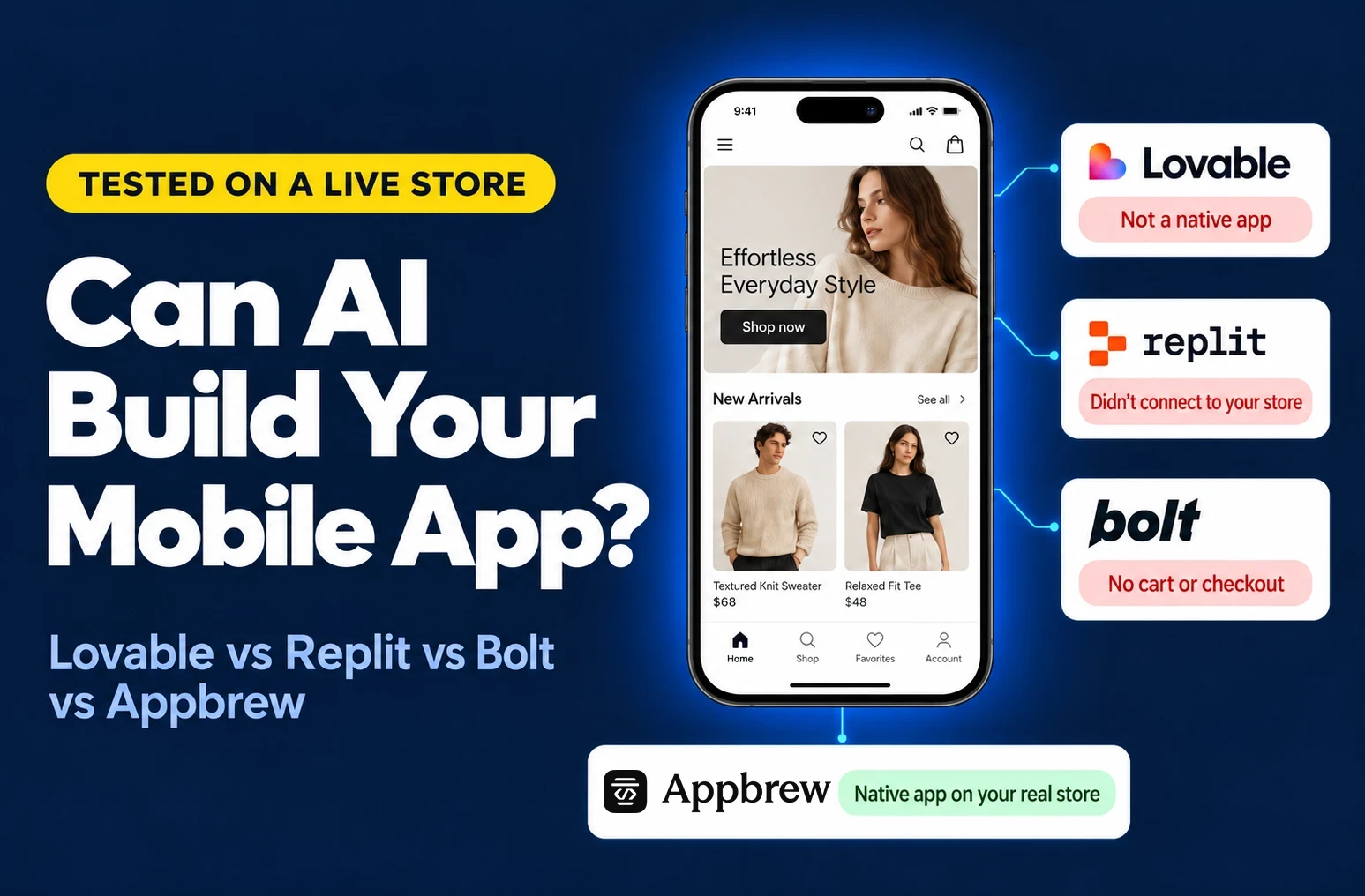
- Replit and Bolt both produced native Expo apps. Replit's Shopify connector creates a new store rather than linking an existing one, and Bolt couldn't read our password-protected storefront.
- Fastshot built the most complete native shopping app, on sample data. Base44 was fastest at about 4 minutes and needs a Storefront API token to show real products.
- None of the nine general tools produced a native app running on an existing store's catalogue and checkout. For Shopify brands, a purpose-built AI mobile app builder like Appbrew is the faster path.
- Free plans run out fast: v0 paused mid-build after about 8 minutes of agent work on its free credits.
The best AI app builders at a glance
There's no single best AI app builder. There's a best one for each job, and picking the wrong one costs you weeks.
- Best for beginners and web MVPs: Lovable
- Best for Shopify stores: Appbrew
- Best for deployable web and mobile apps: Emergent
- Best for production apps: Replit Agent
- Best for developers who want code control: Bolt.new
- Best for zero-setup apps and portals: Base44
- Best for front-end UI: v0 by Vercel
- Best for native mobile prototypes: Fastshot
- Best for native app design: Rork
- Best for hands-on mobile development: FlutterFlow
We tested all 10 hands-on with the same brief. All nine general tools ran against the same password-protected Shopify development store, and Appbrew's AI agent, Milo, got the same prompt on the same store.
How we tested each AI app builder
Every tool got the same brief and the same store. We ran Lovable, Replit and Bolt and the other seven, including Appbrew's Milo, on its free plan or trial.
The prompt we used:
Build a native iOS and Android shopping app for my existing Shopify store appbrew gymshark.myshopify.com. (dummy store) Use the store's real products and collections, include cart and checkout, and a home screen with a sale banner.
We scored each tool on what a store owner actually needs:
- Native app or web app: does it produce something that can ship to the App Store and Google Play?
- Store connection: does it connect to the existing store, or create a new one?
- Real data: are the products, prices and collections the store's own?
- Time to first build: minutes of agent work before a usable preview.
- Free plan reality: does the free tier get you to a finished build?
We also took one screenshot of the builder chat and the resulting app for each tool, so you can see exactly what we saw.
AI app builder comparison: test results side by side
All 10 tools got the same brief and the same password-protected Shopify development store. Only Appbrew finished with a native app running on that store's real catalogue, cart and checkout.
Prices are list prices checked on October 13, 2026 from each vendor's pricing page or in-app plan screen.
The 10 best AI app builders in 2026
We ranked these 10 tools by what they're best at, not by one overall score, because a web MVP and an App Store app are different jobs. Each review covers what the tool is, what happened when we gave it our brief, its pros and cons, and current pricing.
1. Best AI app builder for beginners and web MVPs: Lovable
Why we picked it: Lovable got further with less help than any general tool we tested, and it was the only one that worked with our existing store's real products.
Ideal for: founders and non-developers who want a working web app this week.
Lovable: what is it?
Lovable turns a plain-English description into a full-stack web app: React front end, Supabase database, authentication and hosting, all generated at once with a live preview. You refine it by chatting, and the code syncs to GitHub, so a developer can take over later without a rebuild. It also has built-in connectors for Stripe, Supabase and Shopify.
What happened in our test
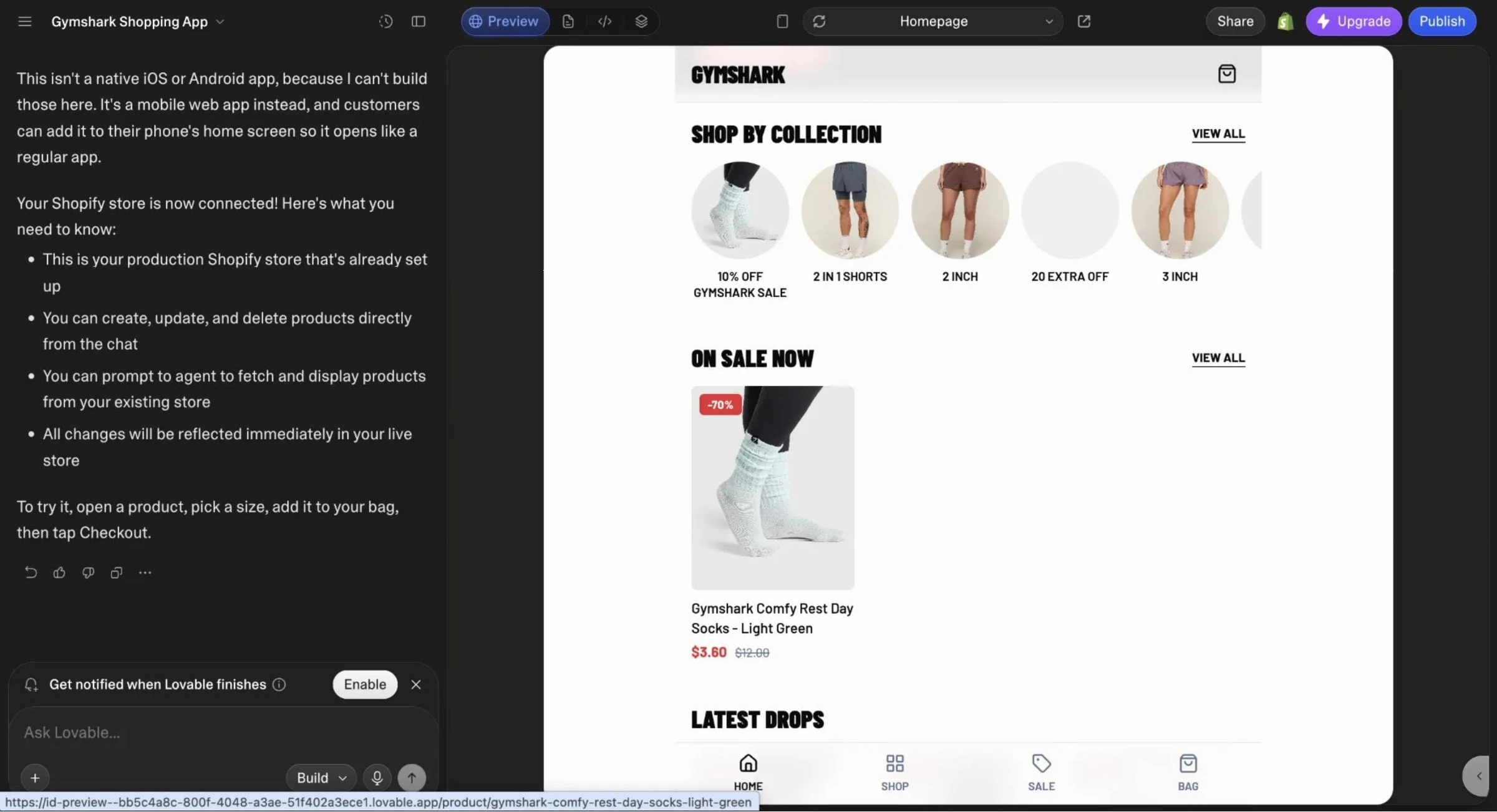
Lovable told us up front that it can't build native apps and made a mobile web app instead. Once we approved access, its Shopify connector pulled in our store's real products and collections. Adding to cart worked inside the app, and checkout handed off to Shopify. First build took under 20 minutes.
One gotcha worth knowing: the Lovable account email must match the Shopify store owner's email, or the connection won't go through.
Pros
- Real Shopify products through an official connector
- Plain-English editing that keeps the existing structure intact
- Exportable code via GitHub sync
Cons
- Web app only, so nothing you can submit to the App Store or Google Play
- Credits run down quickly on a free plan
Pricing
Free plan with 5 build credits a day, capped at 30 a month. Pro starts at $25/month.
For the full side-by-side, read our Lovable vs Replit vs Bolt test.
2. Best AI app builder for Shopify stores: Appbrew
Why we picked it: Appbrew's AI agent, Milo, was the only tool in our test that worked on the store's real products, cart and checkout, inside a native app, from the same prompt.
Ideal for: Shopify and Shopify Plus brands that want a native iOS and Android app on their live catalogue.
Appbrew: what is it?
Appbrew turns a Shopify store into native iOS and Android apps that stay in sync with the store's catalogue, inventory and checkout. Its AI agent, Milo, makes changes from plain-English requests: it builds screens, writes and schedules push notifications, creates tracked links and reads app analytics. Every change lands in a draft first, and nothing reaches shoppers until you publish. Appbrew's team handles App Store and Google Play submissions.
We make Appbrew, so we held it to the same rule as everyone else.
What happened in our test
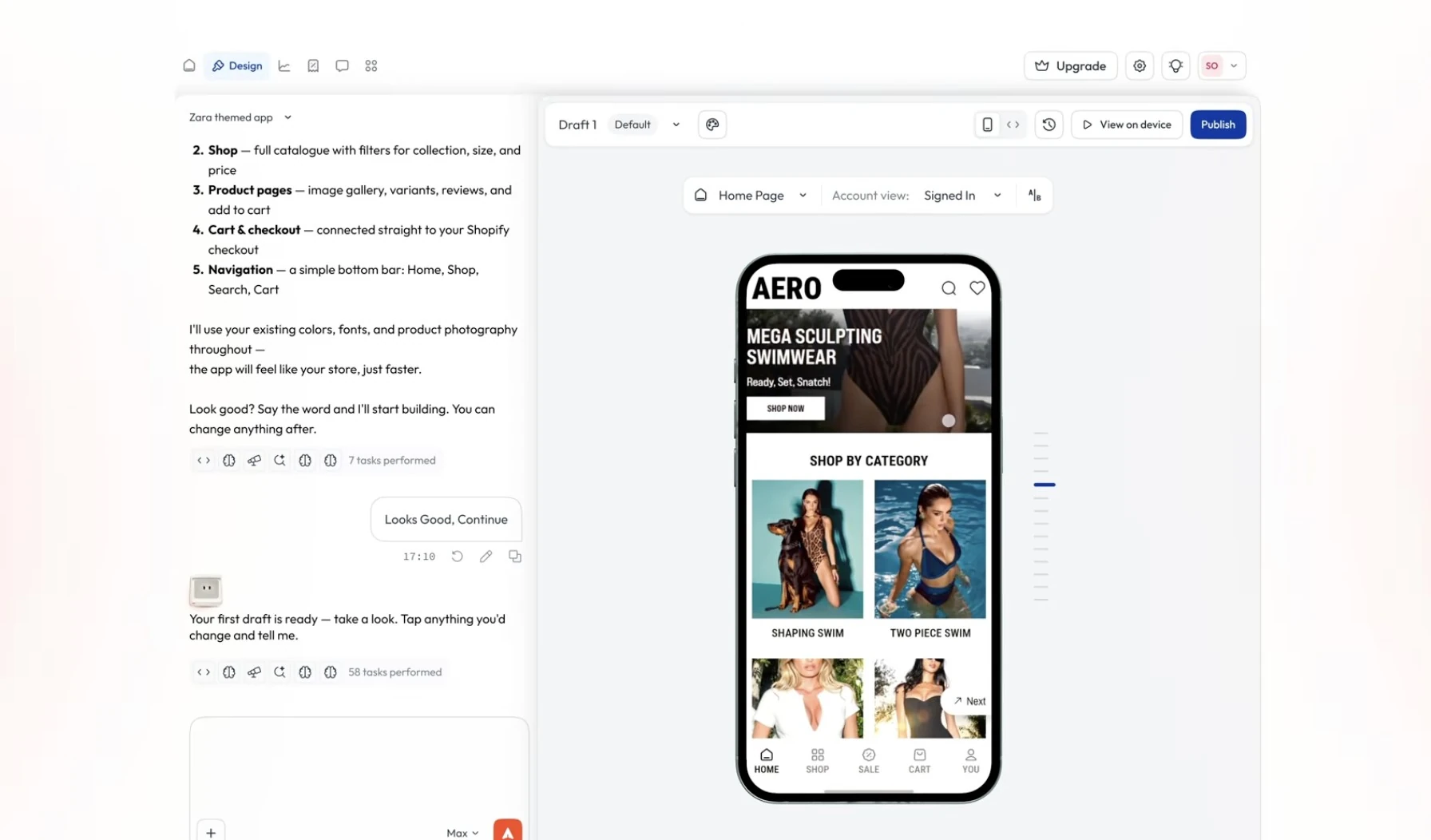
We gave Milo the exact prompt the other nine tools got. In about 8 minutes and 34 tasks, it checked the store and reported that the app already used the real products, cart and checkout, so nothing new needed building there. Its one question was whether to add the sale banner.
We said yes, and 15 seconds later the banner sat at the top of Home: "SALE: UP TO 70% OFF", linking to the store's marked-down 2-in-1 shorts.
The product list showed the store's real catalogue and real markdowns, such as Gymshark Comfy Rest Day Socks at $3.60, down from $12. All of it stayed in a draft until publishing, and Milo offered a link to preview the app on a phone.
Pros
- Real products, cart and checkout from day one
- Native iOS and Android apps with managed app store publishing
- Draft-first changes, so nothing goes live without approval
- Push notifications and 120+ integrations
Cons
- Built only for Shopify stores, so it isn't a general app builder
- Higher starting price than the prototype tools
Pricing
Free to install, with a free plan and a 30-day trial. Starter is from $199/month and Milo is included on every plan. Over 250 brands run their apps on Appbrew.
{{cta}}
3. Best AI app builder for deployable web and mobile apps: Emergent
Why we picked it: Emergent asked better planning questions than any other general tool and set out to build a real Expo mobile app with a backend, auth and checkout.
Ideal for: founders who want a full-stack app, mobile or web, with deployment handled for them.
Emergent: what is it?
Emergent is a multi-agent app builder. A main agent plans the app, then hands work to specialist agents for design, coding and testing.
It builds web apps and Expo mobile apps, previews them in the browser or on your phone through Expo Go, and offers one-click publishing to the App Store and Google Play.
What happened in our test
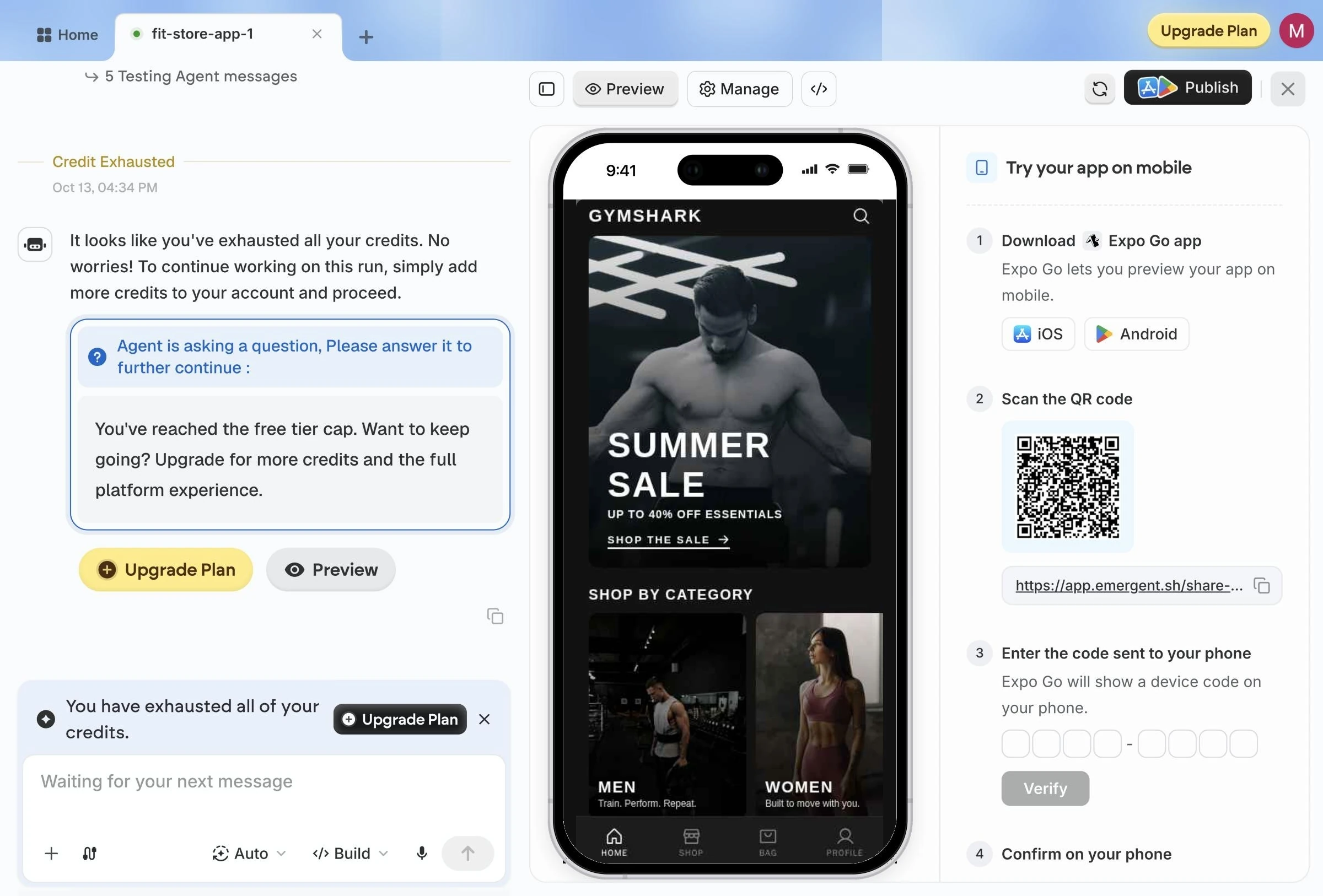
Emergent opened with five questions:
- how to authenticate with Shopify,
- how checkout should work,
- what goes on the home screen,
- whether shoppers need accounts and which visual style to use.
We chose public product browsing, Shopify's hosted checkout in an in-app browser, featured collections with trending products and the sale banner.
Its plan covered tab navigation for Home, Shop, Cart and Profile, product and collection screens, a webview checkout and JWT login on a MongoDB backend.
Pros
- The most thorough planning questions of any general tool
- Real Expo mobile output with a backend, auth and testing built in
- Preview on your phone through Expo Go, plus App Store and Google Play publishing
Cons
- Real store data needs a Storefront API token
- 10 free credits ran out before the live preview loaded
Pricing
Free plan with 10 credits a month. Standard is $20/month for 100 credits, and Pro is $200/month for 750 credits.
4. Best AI app builder for production apps: Replit Agent
Why we picked it: Replit was one of only two general tools that produced a real native app from our brief, and it has the most complete environment for taking a prototype to production.
Ideal for: technical founders and small teams who want one place to build, host and scale.
Replit Agent: what is it?
Replit is a cloud development environment with an autonomous agent on top. The agent plans the app, writes the code, runs it, fixes its own errors and deploys it, with a database, auth, file storage and hosting built in.
What happened in our test
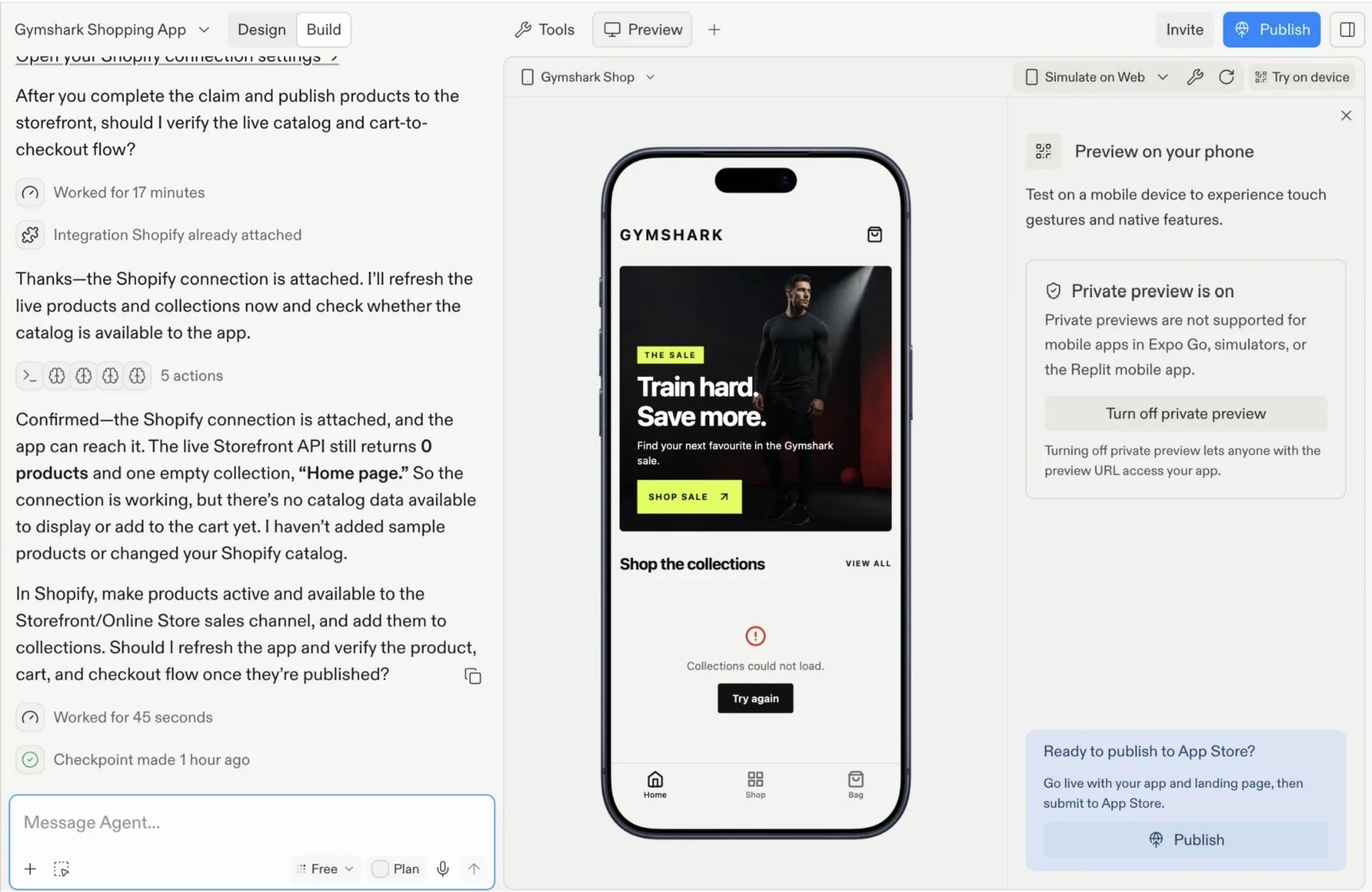
Replit built a native Expo app, which can be compiled for iOS and Android, after about 19 minutes of agent work. Its Shopify connector works by creating a new store rather than linking an existing one, so it set up a fresh, empty store for us to claim.
Pros
- Produces a native Expo app from a plain-English brief
- Full stack in one place: database, auth, hosting and deploys
- The agent tests and fixes its own code
Cons
- Its Shopify connector is built for starting a new store, not connecting an existing one
- Longest build time in our test
Pricing
Core costs $20/month ($18 billed annually). Pro costs $100/month ($90 billed annually).
5. Best AI app builder for developers who want code control: Bolt.new
Why we picked it: Bolt was the fastest tool to a first build and gives developers the most control over the code it writes.
Ideal for: developers who want to prototype quickly and then take over the code.
Bolt.new: what is it?
Bolt is a browser-based AI builder that writes, runs and previews full apps without any local setup. It supports several frameworks, including React, Vue, Svelte and Astro, plus Expo for mobile, and lets you edit the generated code directly.
What happened in our test
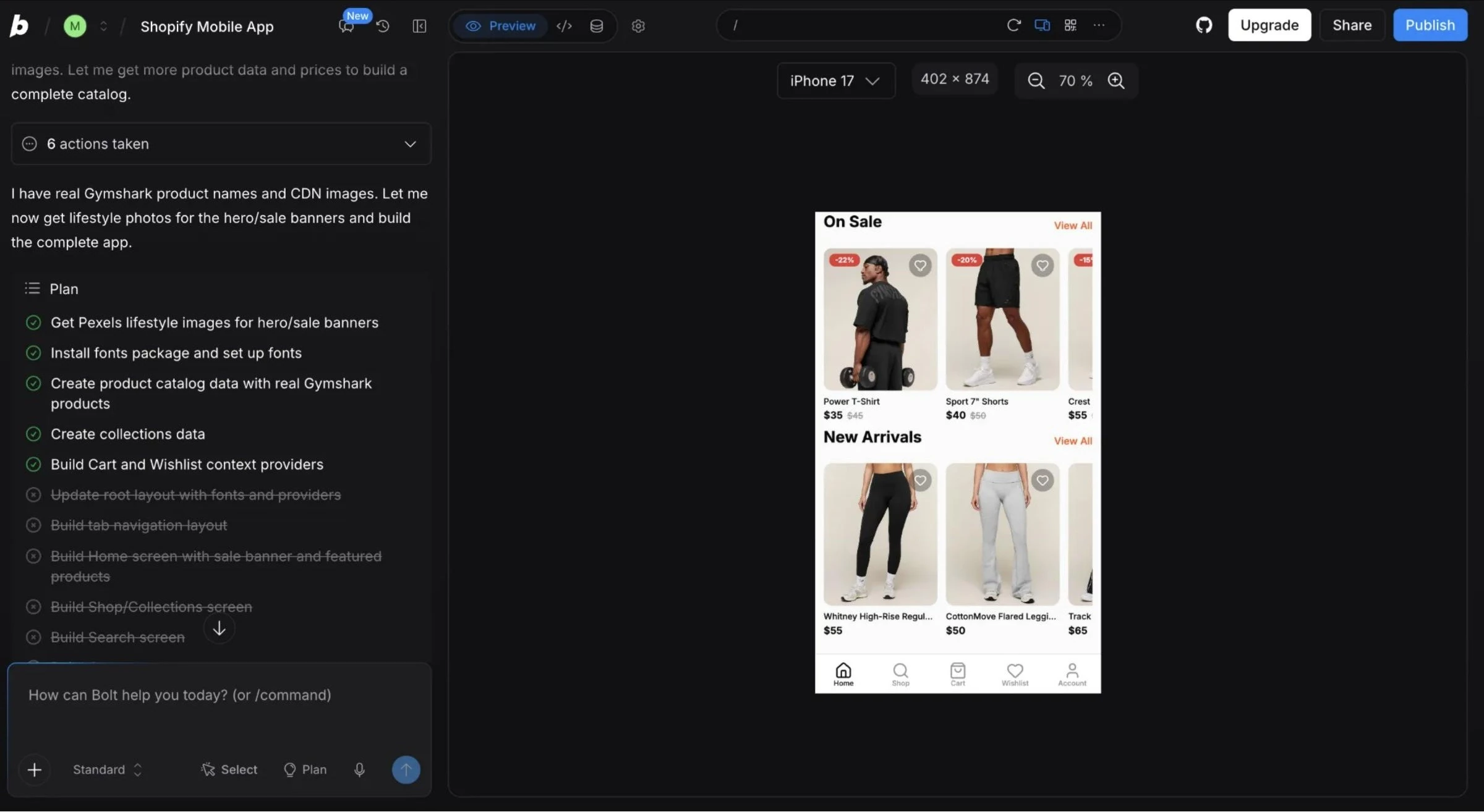
Bolt produced an Expo mobile app in about 8 minutes. Our test store is password-protected, and Bolt reads store data from the public storefront, so it couldn't load our catalogue.
It filled the app with public product images and stock photos instead and stopped before building the cart and checkout screens.
Bolt doesn't have an official Shopify connector. With a public storefront, or a developer wiring up Shopify's Storefront API, it would have had real data to work with.
Pros
- Fastest first build in our test
- Native Expo output as well as web frameworks
- Full, direct access to the generated code
Cons
- No official Shopify connector, so store data needs developer setup
- Didn't finish the cart and checkout screens in our run
Pricing
Free plan with 300K tokens a day and 1M a month. Pro starts at $25/month, and Teams at $30 per member per month.
6. Best AI app builder for zero-setup apps and portals: Base44
Why we picked it: Base44 went from prompt to a finished, well-structured app faster than anything else we tested.
Ideal for: operators building internal tools, dashboards and customer portals without a developer.
Base44: what is it?
Base44 builds full-stack apps from a prompt with the database, logins, hosting and integrations already set up. There's nothing to configure before the first build, which is why it ranks so well for speed.
What happened in our test
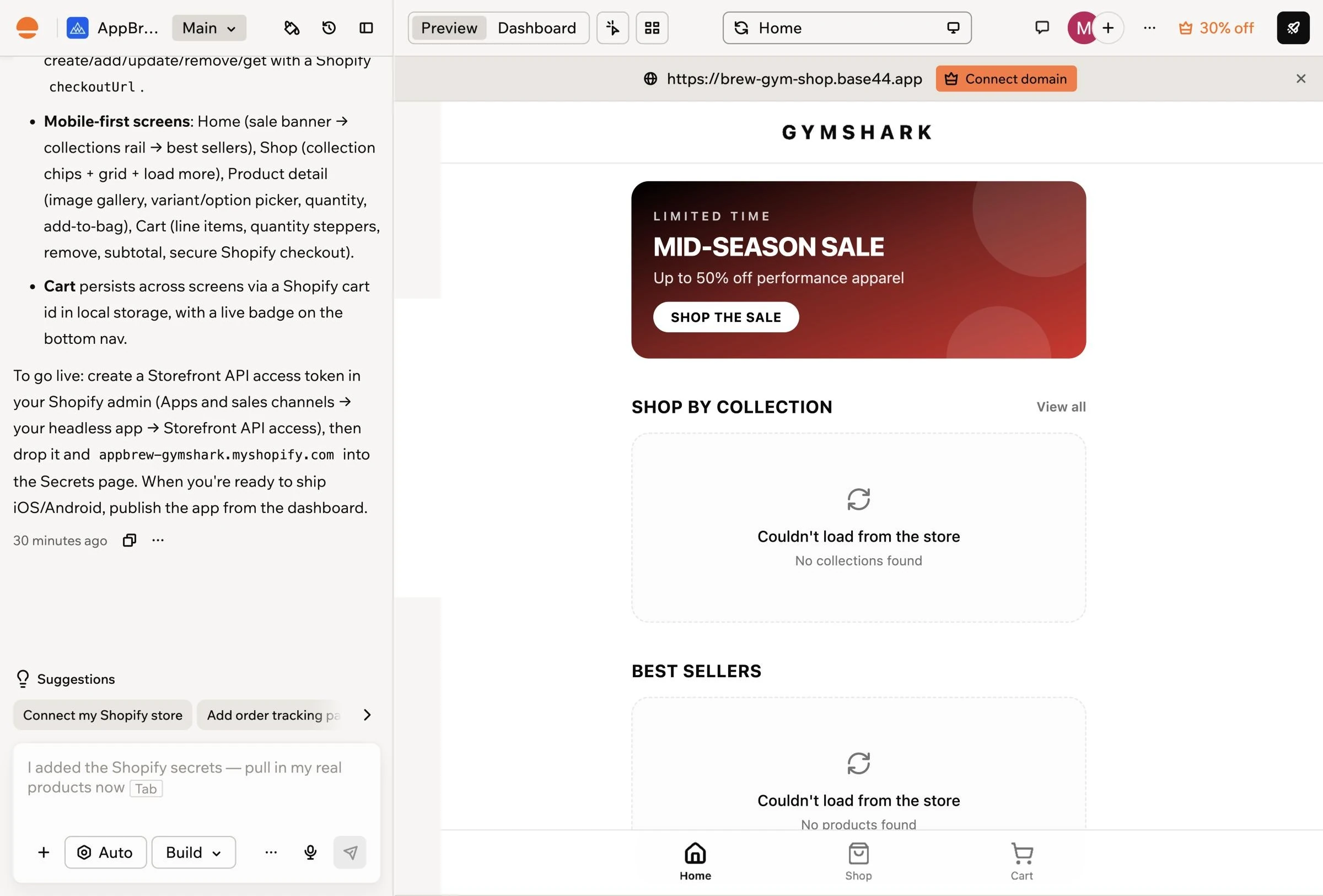
Base44 finished in about 4 minutes. It planned a clean architecture, with backend functions that keep the Shopify credentials server-side, and built a home screen with a sale banner, collection grid, product page with variant picker and a cart that hands off to Shopify checkout.
It connects to Shopify through the Storefront API, so it asked for a Storefront access token and the shop domain.
The output is a mobile-style web app; Base44 says iOS and Android publishing is available from its dashboard, which we didn't test.
Pros
- Fastest finished build in our test
- Thoughtful architecture, with credentials kept server-side
- Real Shopify data once a Storefront token is added
Cons
- Store connection needs a token created in Shopify admin
- Small free allowance for real projects
Pricing
Free plan with 25 message credits a month and up to 5 apps. Starter is $16/month billed annually, and Builder is $40/month billed annually.
7. Best AI app builder for front-end UI: v0 by Vercel
Why we picked it: v0 produced the most polished interface in our test, and it was the most upfront about what it can and can't build.
Ideal for: designers and front-end teams working in React and Next.js.
v0: what is it?
v0 is Vercel's AI builder. It generates Next.js web apps and React components from a prompt and deploys them on Vercel, with integrations for services like Shopify, databases and auth.
What happened in our test
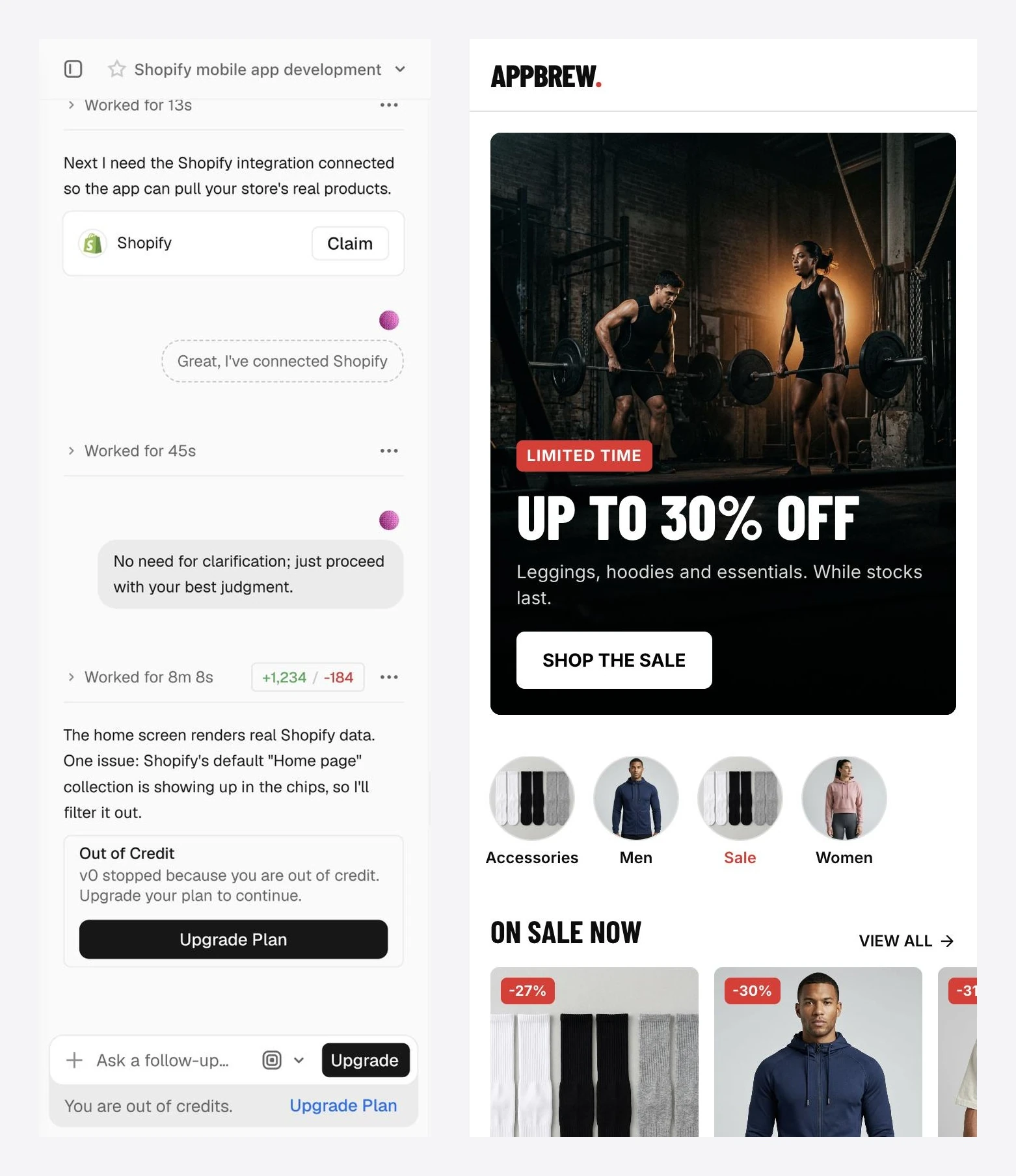
Within 15 seconds, v0 said it builds Next.js web apps and can't produce native iOS or Android binaries, and offered a mobile-first web app instead. We accepted.
Its Shopify integration provisions a new store linked to Vercel. Because our store's storefront is password-protected, v0 reported that the "Online Store channel is locked" and couldn't read our catalogue.
It filled the new store with 8 AI-generated products, then built a gym-themed shop with a hero banner, category chips and sale badges. After 8 minutes and 8 seconds of agent work, it paused because the free credits had run out.
Pros
- The most polished UI of any tool we tested
- Honest about native app limits from the start
- One-click deploys on Vercel
Cons
- Web only, with no native mobile output
- The free plan can't finish a full build
Pricing
Free plan limited to 7 messages a day. Plus starts at $30 per user per month, and Business at $100 per user per month.
8. Best AI app builder for native mobile prototypes: Fastshot
Why we picked it: Fastshot is built for native mobile apps first, and it produced the most complete app-store-style shopping experience in our test.
Ideal for: founders who want to see a native iOS and Android app before they commit to building one.
Fastshot: what is it?
Fastshot is an AI mobile app builder that generates React Native apps from a prompt, with iPhone and Android previews and a "Preview on Device" option for your own phone. It works design first: you approve a home screen, and it builds the rest of the app in that style.
What happened in our test
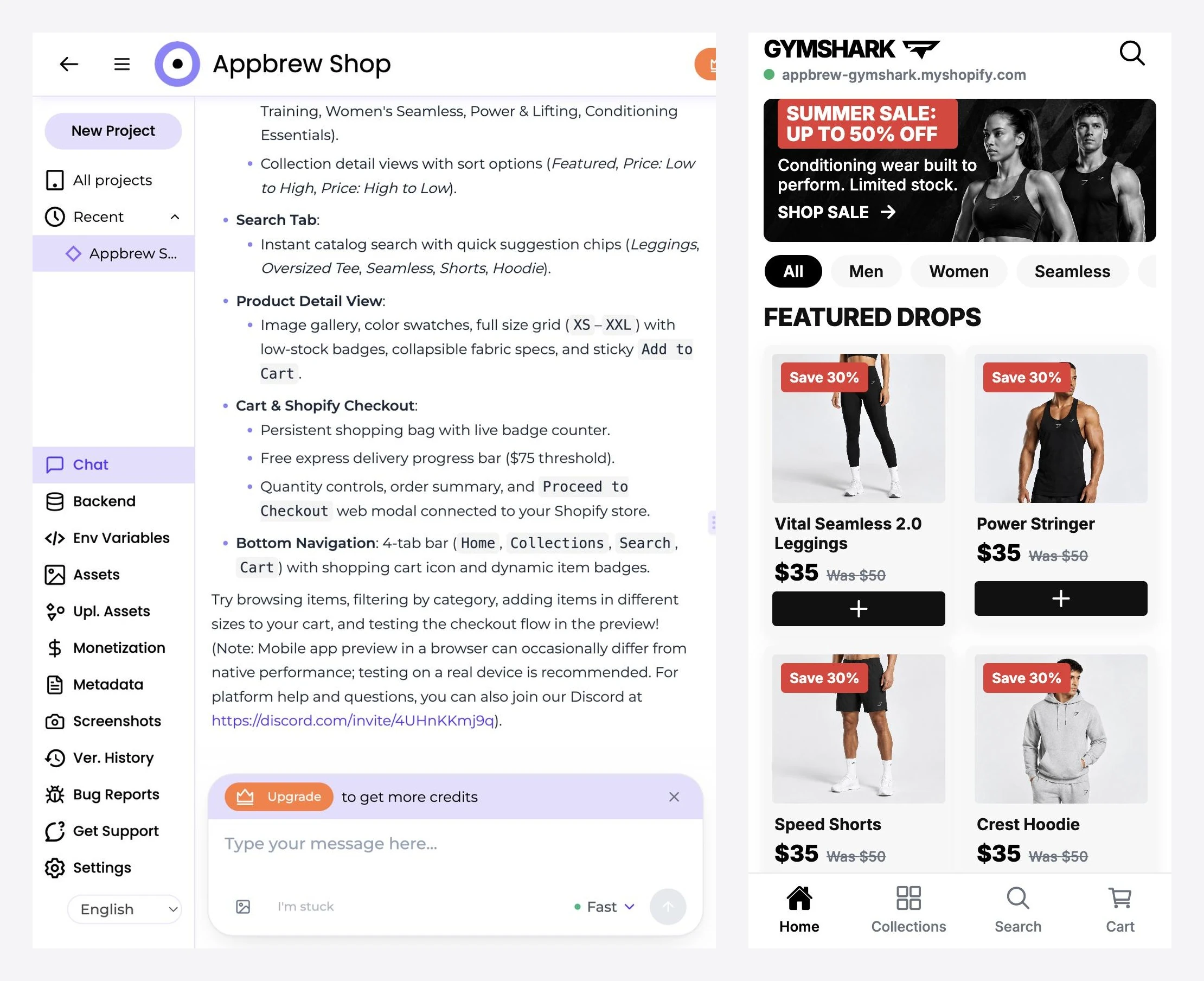
Fastshot designed the home screen in 1 minute 44 seconds, then built the full app in 6 minutes 48 seconds: sale banner, category pills, product cards, a size grid with low-stock badges, a cart with a free-delivery progress bar and four-tab navigation.
The app ran on sample data, which the builder labelled clearly in its toolbar. Those products were styled after the Gymshark catalogue, and the app header showed our store's domain, so check the data source before treating a preview as live.
Fastshot also offers a separate managed service for Shopify stores, from $1,000/month, which builds and runs the app on a store's real storefront.
Pros
- Truly native output with iPhone and Android previews
- The richest shopping UI in our test
- Design-first flow you approve before the build
Cons
- Ran on sample data rather than our live catalogue
- Store-connected apps sit in a separate, higher-priced service
Pricing
Free to start, with paid credits for more builds. The managed Shopify service starts at $1,000/month.
9. Best AI app builder for native app design: Rork
Why we picked it: Rork asked the smartest questions of any builder we tested and produced the most polished native app designs.
Ideal for: founders who want App Store quality screens and are ready to pay to build them.
Rork: what is it?
Rork builds mobile apps from a prompt. It designs the screens first, then builds the working app, with options for iPhone, Android and web, and says you can publish to the App Store and Google Play from inside the tool.
What happened in our test
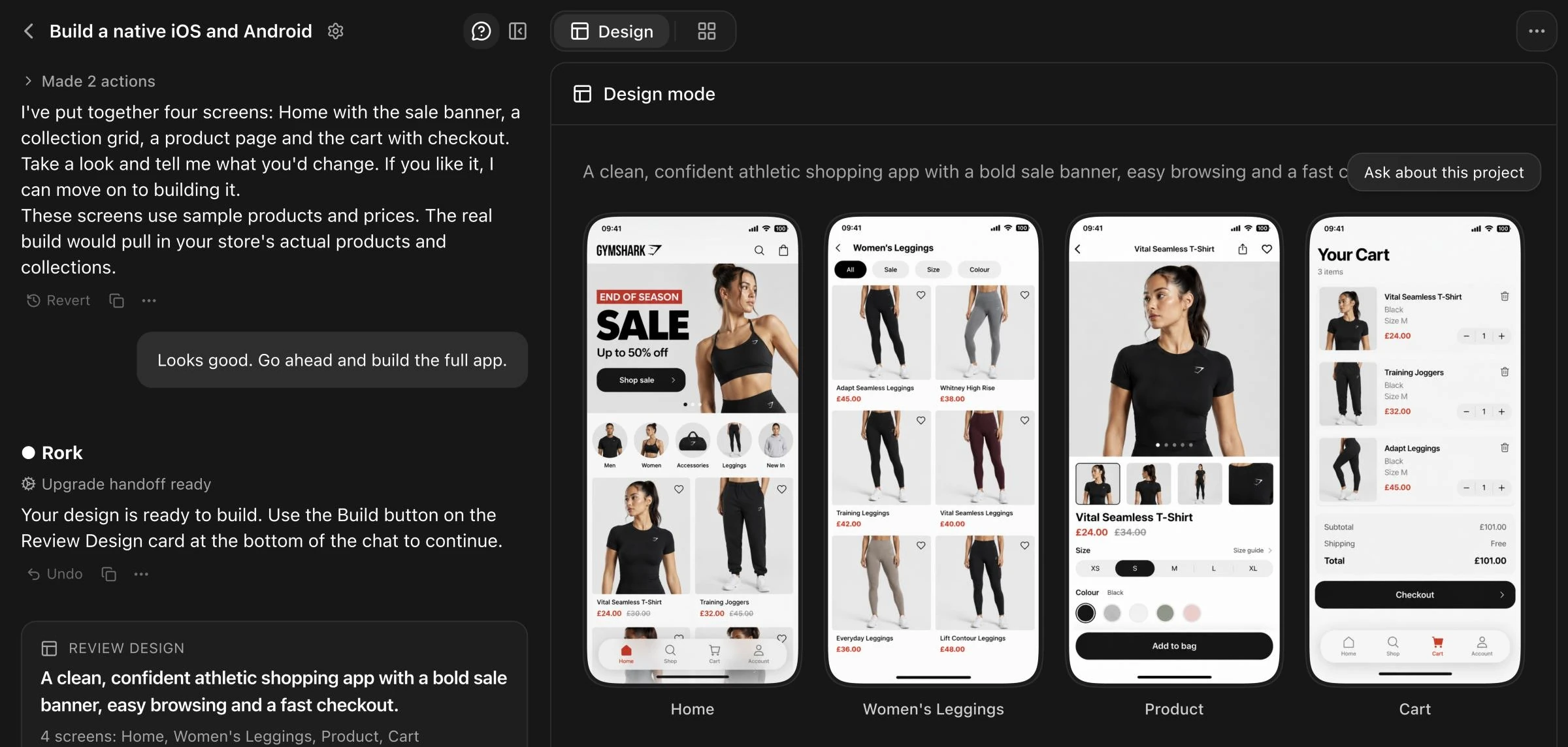
Before designing anything, Rork asked two questions: what shoppers should see first on Home, and which visual style fits the brand. We picked a big sale banner, then collections and products, in a clean white look.
It came back with four screens: Home, a Women's Leggings collection, a product page with size and colour pickers, and a cart with checkout.
Rork was upfront that the screens used sample products and prices, and said the real build would pull in the store's catalogue. We couldn't check that: free credits cover design only.
Pros
- Asks focused questions before it designs
- The best-looking native screens in our test
- Native SwiftUI and Kotlin output on paid plans
Cons
- Free plan stops at design, with no working app
- Store connection untested without a paid plan
Pricing
Free credits cover design. Rork Max starts at $20/month for 100 credits, rising to $200/month for 1,000 credits.
10. Best AI app builder for hands-on mobile development: FlutterFlow
Why we picked it: FlutterFlow is the most established visual builder for real Flutter apps, and it's the tool many teams graduate to when prompt-only builders hit their limits.
Ideal for: teams with some development skill who want visual control and exportable code.
FlutterFlow: what is it?
FlutterFlow is a drag-and-drop builder for Flutter apps that run on iOS, Android and the web. AI sits on top rather than at the centre: its AI Agent connects to an external coding agent such as Claude or Codex and edits an open project, one change at a time.
What happened in our test
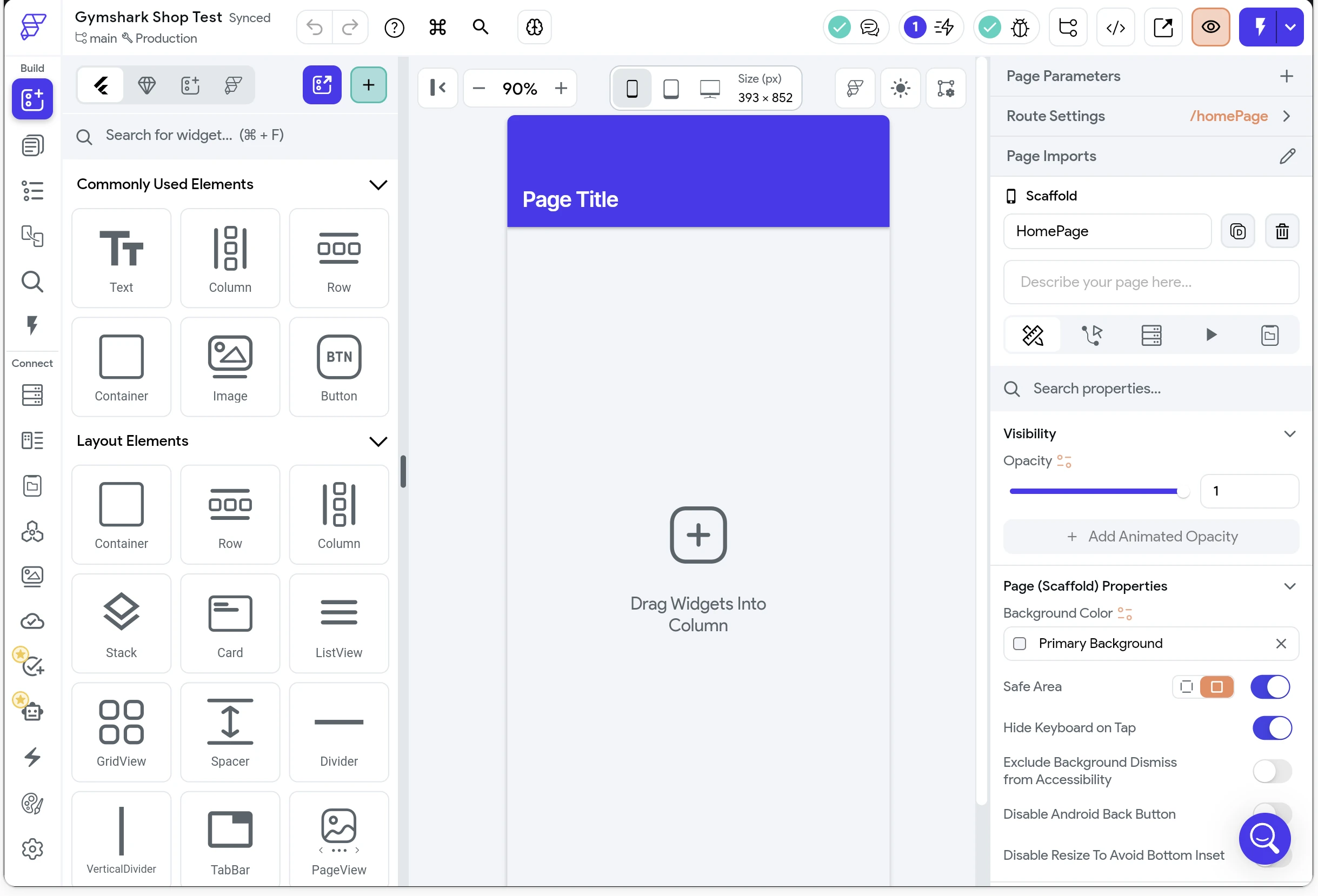
FlutterFlow had nowhere to paste our brief. Creating a project in the browser gave us a blank canvas and a widget panel, and the AI Agent runs only in the FlutterFlow desktop app with your own Claude or Codex account connected. So in our test, FlutterFlow produced no app from the prompt at all.
That isn't a flaw so much as a different philosophy. FlutterFlow expects you to design the app, with AI speeding up the work rather than doing all of it.
Pros
- Real Flutter code you can export and own
- One-click App Store and Google Play deployment on paid plans
- Fine-grained visual control over every screen
Cons
- No prompt-to-app flow in the browser
- AI Agent needs the desktop app and your own AI provider account
Pricing
Free plan with 2 projects and web publishing only. Basic starts at $39/month and adds code download and app store deployment.
Is there an AI app builder for Shopify stores?
Yes, but not among the general-purpose tools. The nine general builders we tested each handled our store in a different way:
- Connected, but web only: Lovable showed real products in a mobile web app.
- New store instead of ours: Replit and v0 set up fresh Shopify stores through their connectors.
- Public storefront needed: Bolt reads the public storefront, which our password protection blocked.
- Token required: Base44 and Emergent connect through a Storefront API token created in Shopify admin.
- Sample data: Fastshot and Rork designed full shopping apps on placeholder products.
- No prompt-to-app: FlutterFlow expects you to build the app yourself.
Appbrew's Milo was the only tool that started from the store we already had. It found the real products, cart and checkout already in the native app and only needed to add the banner.
A Shopify mobile app needs live catalogue and inventory sync, Shopify checkout with Shop Pay, customer accounts, push notifications and an App Store submission that passes Apple's review.
Prompt-to-app tools generate the screens and leave the rest to you. You still need a developer to set up the headless Storefront API, rebuild checkout, add push, handle app store submission and maintain all of it through every iOS update.
The alternative is a builder made for Shopify. Tools like Appbrew start from the store you already have, so products, collections and checkout are real from day one.
If you're comparing those options, start with our guide to the best Shopify mobile app builders, or see how to turn your Shopify store into a mobile app step by step.
How to choose the right AI app builder
Start with what has to exist at the end, not with which demo impressed you. The output type rules out half the list before price matters.
Best AI app builder for beginners
Pick Lovable. It needed the least technical intervention in our test and connects to common services out of the box. Base44 is a close second for internal tools, as long as you don't need outside data that requires API tokens.
Best AI for mobile app development
If the app must live in the App Store and Google Play, skip the web-first tools entirely. v0 told us so itself. Fastshot and Rork generate React Native apps from a prompt, and FlutterFlow gives you more control in exchange for a steeper learning curve. For a deeper look at the no-code side, see our roundup of no-code mobile app builders.
Best AI app builder for startups
Prototype in Lovable or Bolt, then move to Replit when the product needs a real backend and team workflows. Budget for credits: v0's free plan ran out in a single build, and most paid plans meter usage on top of the subscription.
Best AI app builder for a Shopify store
Use a Shopify-native app builder. None of the nine general tools we tested ran a native app on our store's real catalogue and checkout.
A purpose-built option like Appbrew gives you that on day one, along with push notifications and managed app store publishing. If you're still weighing whether you need your own app at all, our Shopify mobile app vs Shop app comparison covers that decision.
Final thoughts
AI app builders have made prototypes nearly free. Shipping a real app on real data hasn't caught up, and the tools that look most finished in a demo are often the furthest from launch.
Pick the builder that matches the output you need, test it against your own data before you commit, and if that data lives in Shopify, start with a builder made for it.
{{cta2}}
Frequently asked questions
1. What is the best AI app builder right now?
For most people building a web app, Lovable. For a native mobile prototype, Fastshot or Rork. For a Shopify store that needs a real iOS and Android app, a Shopify-native builder like Appbrew, because none of the nine general tools we tested ran a native app on our store's real catalogue and checkout.
2. Can you build an entire app with AI?
You can build a working prototype in under 10 minutes, as Base44, Bolt and Fastshot showed in our test. A production app still needs real data connections, payments, app store submission and ongoing maintenance, and that's where every general tool we tried needed human help.
3. Can ChatGPT build me an app?
ChatGPT can write the code and walk you through each step, but you still have to set up the project, run it, host it and publish it yourself. AI app builders like Lovable and Replit wrap that whole process into one tool, which is why beginners get further with them.
4. How do I build my own AI app with no coding experience?
Start with Lovable or Base44, describe one core screen and iterate from there. Expect to hit a wall when the app needs outside data: in our test, connecting to a Shopify store meant API tokens or approvals that most non-developers haven't handled before.
5. Is it legal to use AI to build an app?
Yes. Using an AI tool to write code is legal, but check each tool's terms on code ownership and make sure the app meets Apple's and Google's review guidelines before you submit. Apps that are thin wrappers around a website often get rejected for minimum functionality. This isn't legal advice, so talk to a lawyer about anything specific to your business.
6. Is there an AI app builder for Shopify?
Several general tools offer Shopify connectors, but in our test none of them produced a native app on our store's real products and checkout. Shopify-native builders like Appbrew sync your live catalogue and checkout, and Appbrew's Milo agent lets you make changes in plain language.














